Invoice template for small business: a free example you can copy
A simple invoice template for a small business: every field explained, a filled-in example to copy, spreadsheet formulas and the mistakes that delay payment.
Some links on this page may be affiliate links. If you buy through them we may earn a commission, at no extra cost to you. How this works.
You do not need special software to send a correct invoice. A clear template in a document or spreadsheet is enough to start, as long as nothing important is missing. This guide gives you a template to copy, explains each field, and shows the formulas to make it calculate itself.
Note: Invoice rules differ from country to country and sometimes by region, especially for sales tax and VAT. This guide is general information, not legal or tax advice. Check your local rules or ask an accountant.
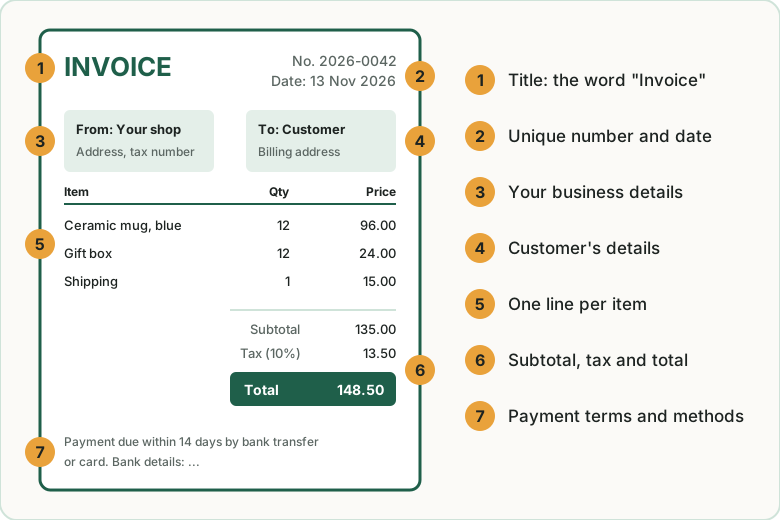
What an invoice template must contain
| Field | What to write | Why it matters |
|---|---|---|
| Title | The word “Invoice” | Separates it from a quote or a receipt |
| Invoice number | A unique number in sequence, such as INV-0042 | Needed for your records and often required by law |
| Issue date | The date you send it | Payment terms count from this date |
| Due date | An exact date, not only “30 days” | A date is harder to misread than a term |
| Your details | Business name, address, email, tax number if you have one | Tells the customer who to pay |
| Customer details | Name, billing address, their tax number if required | Their accounts team needs it to approve payment |
| Line items | Description, quantity, unit price, line total | Shows exactly what is being charged |
| Subtotal, tax, total | The tax rate and amount on their own line | Required where sales tax or VAT applies |
| Payment terms | When and how to pay, and any late fee | Removes excuses for paying late |
| Reference | The customer’s purchase order number, if they gave one | Many companies will not pay without it |
An invoice example to copy
Copy this into a document, replace the text in capitals with your own, and save it as your template.
INVOICE

Invoice number: INV-0042
Issue date:     November 13, 2026
Due date:       December 13, 2026
Your PO number: PO-7781

From:                              Bill to:
YOUR BUSINESS NAME                 CUSTOMER NAME
Street address                     Street address
City, State, ZIP                   City, State, ZIP
you@yourbusiness.example           Tax ID (if required)
Tax ID (if you have one)

Description                    Qty    Unit price    Amount
----------------------------------------------------------
Ceramic mug, blue, 12 oz        24        $8.50    $204.00
Ceramic mug, red, 12 oz         12        $8.50    $102.00
Shipping                         1       $18.00     $18.00
----------------------------------------------------------
                                        Subtotal   $324.00
                                    Sales tax 0%     $0.00
                                           TOTAL   $324.00

Payment terms: Net 30. Please pay by December 13, 2026.
Pay by bank transfer: BANK NAME, ACCOUNT DETAILS
or by card: PAYMENT LINK

Thank you for your order.
Build the template in a spreadsheet
A spreadsheet has one advantage over a text document: it does the sums. In Excel or Google Sheets, put the line items in a small table and add these formulas.
| A | B | C | D | |
|---|---|---|---|---|
| 10 | Description | Qty | Unit price | Amount |
| 11 | Ceramic mug, blue, 12 oz | 24 | 8.50 | =B11*C11 |
| 12 | Ceramic mug, red, 12 oz | 12 | 8.50 | =B12*C12 |
| 13 | Shipping | 1 | 18.00 | =B13*C13 |
| 15 | Subtotal | =SUM(D11:D13) |
||
| 16 | Tax rate | 0% | =D15*C16 |
|
| 17 | Total | =D15+D16 |
For the due date, put the issue date in one cell and the number of days in another, then add them: if the issue date is in B3 and 30 is in B4, the due date is =B3+B4.
When the invoice is ready, export it as a PDF before sending. A PDF cannot be changed by accident and looks the same on every screen.
How to number invoices
- Use one sequence and never reuse a number. INV-0001, INV-0002, INV-0003.
- Do not leave gaps. If you cancel an invoice, keep the number and mark it as cancelled rather than deleting it.
- A year prefix is fine, for example 2026-0042, as long as the sequence inside the year is unbroken.
- Keep a simple log: number, date, customer, total, paid or not. One line per invoice in a spreadsheet is enough.
Five mistakes that delay payment
- No due date. “Net 30” is clear to you, but a date is clear to everyone. Write both. See invoice payment terms explained.
- Missing purchase order number. If a business customer gave you one, their accounts team will hold the invoice until it appears.
- Sent to the wrong person. Ask who approves and pays invoices, and send it there.
- Vague descriptions. “Goods” invites questions. “24 ceramic mugs, blue, 12 oz” does not.
- No easy way to pay. Put bank details or a payment link on the invoice itself, not in a separate email.
When a template is no longer enough
A template works well for a handful of invoices a month. It starts to cost you time when:
- you send more than about ten invoices a month;
- you forget to chase late payers because nothing reminds you;
- you bill the same customers every month and retype the same lines;
- you want customers to pay by card from a link on the invoice.
At that point invoicing software is worth a look, and several good tools are free. Our comparison of the best invoicing software for small business lists what each one allows. If invoices are new to you, start with what to put on an invoice, and keep your records tidy with the monthly bookkeeping checklist.
Common questions
Can I make an invoice in Word or Google Docs?
Yes. Any document tool works as long as the invoice contains the fields listed above. Save or export it as a PDF before you send it.
Do I need an invoice number?
Yes. A unique, sequential number is the one field that almost every tax authority expects, and it is how you and your customer refer to the same document.
Should I charge sales tax or VAT on my invoice?
It depends on where you are, what you sell and whether you are registered for tax. If you are not sure, ask an accountant before you send your first invoice rather than after.
What is the difference between an invoice and a receipt?
An invoice asks for payment. A receipt confirms that payment was made. For sales paid at checkout, the store’s receipt is often enough; an invoice is for business customers and later payment.
Key takeaways
- A valid invoice needs a number, dates, both parties’ details, line items, totals with tax, and payment terms.
- Write an exact due date, and put a way to pay on the invoice itself.
- Number invoices in one unbroken sequence and keep a simple log.
- A spreadsheet template does the calculations for you. Send the result as a PDF.
- Move to invoicing software when you send more than about ten invoices a month or need automatic reminders.
Related guides
Best invoicing software for small business: 5 options compared
Three good invoicing tools are free. Zoho Invoice, Wave, Square Invoices, FreshBooks and QuickBooks Online compared on price, limits and payment fees.
FreshBooks vs QuickBooks vs Wave: which is best for a small online business?
Wave has a free plan, FreshBooks starts at $23 a month and QuickBooks Online at $38. Prices, limits and the right choice for a small online business.
Invoice payment terms explained: Net 30, due on receipt and more
What Net 30, due on receipt and 2/10 Net 30 mean, what payment terms to put on an invoice as a small business, and how to get paid on time.